Background
A server with 2 cores and 4GB of RAM hosts a WordPress corporate site, alongside the Baota panel, PHP-FPM, MySQL and Redis.
Monitoring showed the load hitting 100 percent, yet CPU usage was not high and memory was not exhausted.
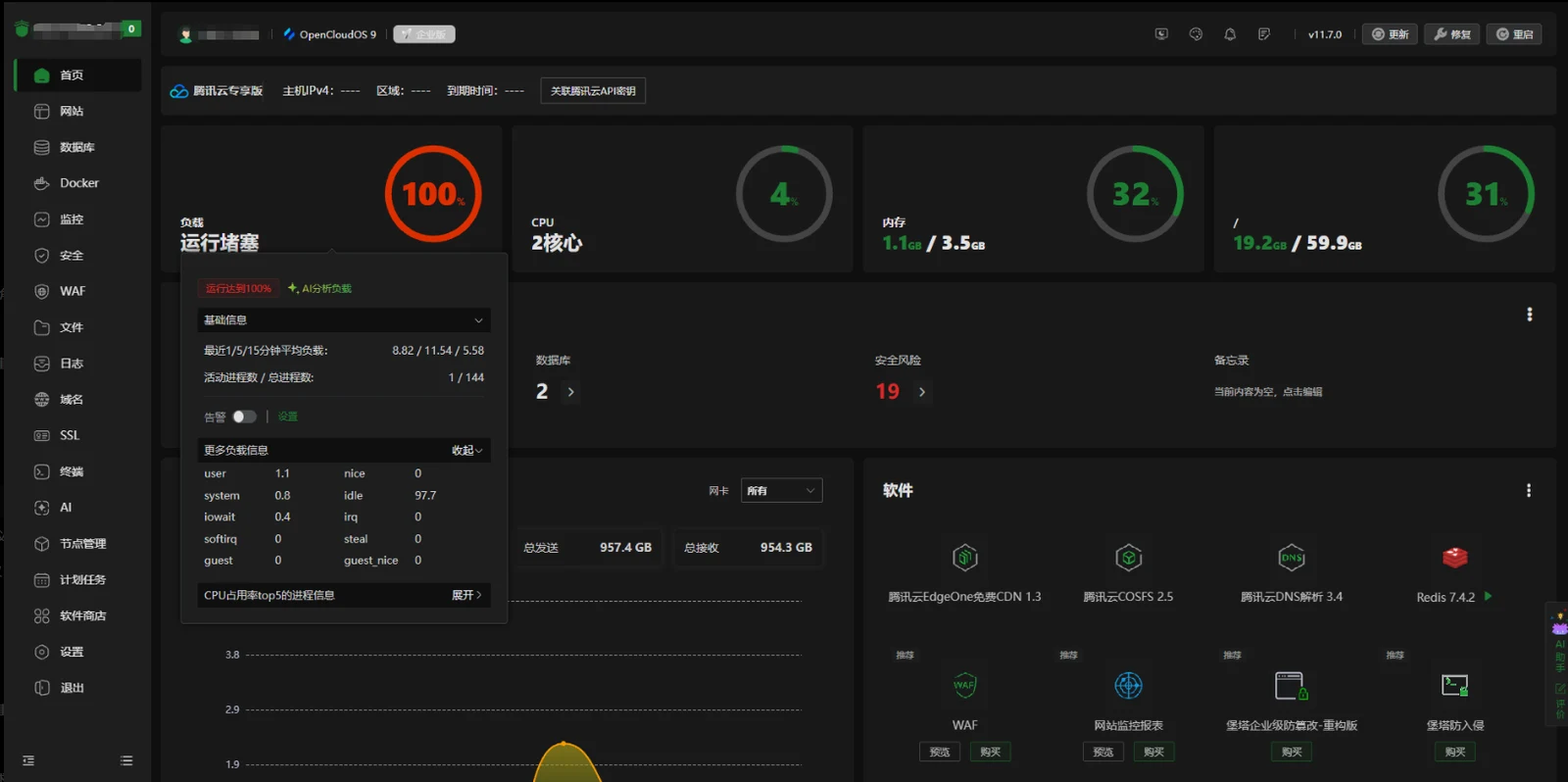
System load showed:
1-minute load:8.82
5-minute load:11.54
15-minute load:5.58
But the CPU looked like:
idle:97%
iowait:0.2%
So the source of the load needed further investigation.
Question one: the load is at 100%, so why isn't the CPU saturated?
Why
Linux's load average is not the same thing as CPU usage.
Server load includes:
- tasks currently using the CPU
- tasks waiting for the CPU
- tasks waiting on disk or other resources
So you can have:
- very low CPU usage
- normal memory
- and a very high load average
This situation is usually related to:
- blocked PHP requests
- database queries waiting
- disk I/O
- a large number of concurrent tasks
Question two: how do you confirm whether WordPress is the cause?
Method
Look at the access log:
tail -5000 /www/wwwlogs/web-chang.com.logCount the endpoints being hit:
awk '{print $7}' log file | sort | uniq -c | sort -nrThe investigation found a lot of requests concentrated on:
/wp-admin/admin-ajax.php

/wp-json/elementor/v1/checklist/user-progress

/wp-json/elementor/v1/global-classes

/wp-json/rankmath/v1/updateMeta

/wp-cron.php

admin-ajax.php?action=as_async_request_queue_runner
which means the main pressure comes from WordPress admin endpoints and plugin tasks.
Question three: which components are generating all these requests?
Analysing the cause
Main sources:
1. Elementor
The Elementor page editor keeps calling:
- REST API
- page state sync
- global style sync
- check tasks
For example:
/wp-json/elementor/v1/checklist/user-progress2. WP-Cron
WordPress triggers scheduled tasks on visits by default.
When someone visits:
/wp-cron.php?doing_wp_cronit runs:
- plugin tasks
- data synchronisation
- cleanup tasks
- queue tasks
As traffic grows, that creates extra PHP requests.
3. Action Scheduler
When the log shows:
admin-ajax.php?action=as_async_request_queue_runnerit means WordPress's async task queue is running.
Common sources:
- Elementor
- WooCommerce
- Rank Math
- form plugins
Question four: how do you reduce WordPress's server load?
Solution one: turn off WP-Cron's automatic trigger
Edit:
wp-config.phpAdd:
define('DISABLE_WP_CRON', true);Then run it from a server cron job:
wget -q -O - https://example.com/wp-cron.php?doing_wp_cron >/dev/null 2>&1set it to run every ten minutes.
That stops visitor traffic from triggering background tasks.
Solution two: limit PHP-FPM concurrency
A 2-core, 4GB server should not run too many PHP processes.
Recommendation:
pm.max_children = 8
pm.start_servers = 2
pm.min_spare_servers = 1
pm.max_spare_servers = 3
pm.max_requests = 500
avoid many PHP child processes holding memory at the same time.
Solution three: enable PHP OPcache
Enable:
opcache.enable=1
opcache.memory_consumption=128
opcache.max_accelerated_files=10000
to cut the cost of recompiling PHP.
Solution four: check Action Scheduler jobs
Query the database:
SELECT status, COUNT(*)
FROM wp_actionscheduler_actions
GROUP BY status;
If a large number of jobs are in:
pending
failed
you need to clean them up or look at the plugin responsible.
Question five: why is a 2-core, 4GB server so prone to this?
Why
A WordPress environment usually includes:
- Nginx
- PHP-FPM
- MySQL
- Redis
- the Baota panel
- several plugins
On 2 cores and 4GB, the resources actually left for WordPress are limited.
When these happen at the same time:
- someone editing a page in Elementor
- WP-Cron running its tasks
- a plugin syncing in the background
- database queries piling up
more PHP requests lead to:
- more PHP-FPM processes
- more memory pressure
- swap being used
- and system load climbing
Summary
The main causes of this load spike:
- WordPress's Elementor admin requests are numerous.
- WP-Cron keeps triggering tasks.
- Action Scheduler runs its async queue.
- PHP-FPM concurrency was never tuned for a low-spec server.
What to optimise in the end:
- disable WP-Cron's default trigger.
- run cron from a scheduled job.
- cap the number of PHP-FPM processes.
- enable OPcache.
- inspect the background jobs plugins create.
On a 2-core, 4GB server running a WordPress corporate site, the point is not to add more PHP processes but to control how many background tasks and plugin requests are running.